Shubh voice
Answers spoken in a warm, natural Indian voice.
 Kibo
Talk or type. Kibo answers out loud, remembers what matters and acts on your Mac — only when you say yes.
Explore featuresAnswers spoken in a warm, natural Indian voice.
It isn’t another chat window. It’s an assistant that lives where you already look.
Kibo costs nothing. It thinks with the Claude or ChatGPT plan you already pay for.
Memory and chats stay on your Mac. Only an answer’s text leaves, to be spoken.
A native island in your notch that opens when you need it and disappears when you don’t.
Every action shows an Allow card first. Say no, and nothing happens.
Say its name and ask. Your words are understood on your Mac, and Kibo answers out loud in Shubh’s voice.
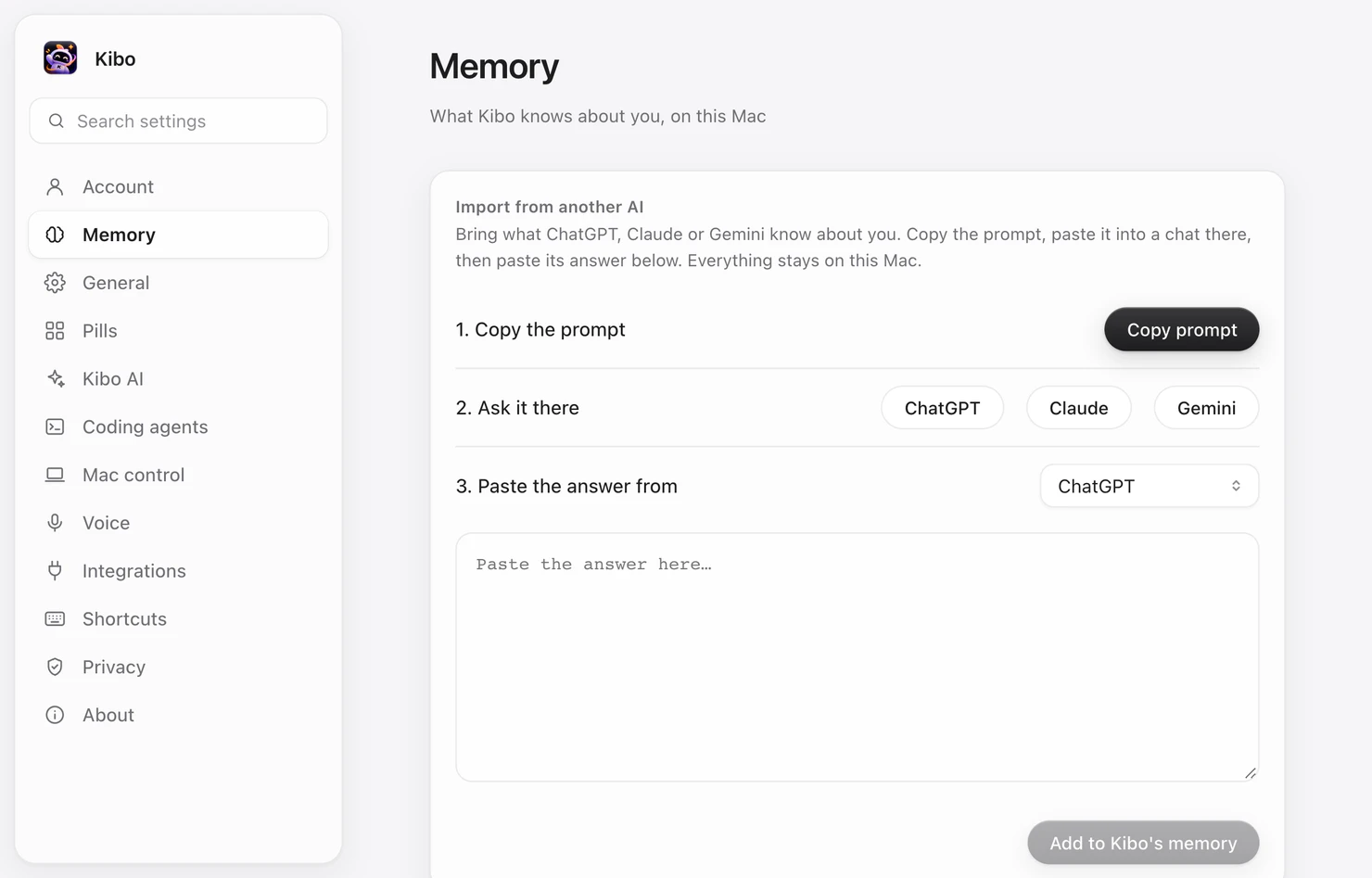
“Remember this.” Kibo keeps what matters — and imports what ChatGPT, Claude or Gemini already know about you.
Open Spotify and play some lofi?
Apps, music, screenshots, reminders and windows. Every action shows an Allow card before anything happens.
Copy Kibo’s prompt into ChatGPT, Claude or Gemini, paste the answer back, and Kibo knows you from day one. This is Kibo’s real Settings.
Claude through your Claude plan, GPT-6 through Codex, or any API key. Switch from the chat in one click.
Music, notes, reminders and answers — say it once, and Kibo takes care of it with your OK.
“Hey Kibo, play some lofi.” Spotify, Apple Music or YouTube — Kibo finds it and presses play.
“Remember that I like my chai without sugar.” Saved on your Mac, used in every chat after.
Reminders, screenshots, calendar and windows — one sentence, no menus, no typing.
Ask a question and the answer appears at the top of your screen, read out loud, then folds away.
Notes, Calendar, Reminders, Spotify, Finder, Safari and more — every action asks you first.
Kibo never charges you. It thinks with the Claude or ChatGPT plan you already pay for — or any API key you bring.
$0forever
The app itself. Voice, memory, Mac control and the island, free for every Mac.
Download free$0with Claude Pro or Max
Chat with Claude through the plan you already pay for, via Claude Code.
Use my Claude plan$0with ChatGPT Plus or Pro
Chat with GPT-6 through your ChatGPT plan, via Codex on your Mac.
Use my ChatGPT planPayas you go
Bring a key from any provider. Pay only for what you use.
Add my keyYes. Kibo is free to download. For chat it uses your own Claude or ChatGPT plan, or an API key you add, so you only pay for what you already use.
Macs with Apple silicon (M1 or later) on macOS 12 Monterey or later. It works on Macs with and without a notch.
Your memory and your chats are files on your Mac that only your account can read. Nothing is sent to DevreonDevs. To speak an answer, only its text goes to Kibo’s voice server, which keeps no text.
Only for Kibo’s natural voice: sign in with Google once. Without it, Kibo still works and speaks with your Mac’s own voice.
This first release isn’t notarized by Apple yet. Right-click Kibo in Applications, choose Open, then Open again. You only do this once.
Siri is built into macOS. Kibo is a separate, free app that brings Claude or ChatGPT on your own plan, or a local model, into your Mac’s notch. It remembers what you tell it on your Mac and can do multi-step tasks for you, each one after you allow it.
“Hey Kibo” and speech recognition run on your Mac. Answers come from the AI you choose: Claude, ChatGPT and API keys need the internet, while a local model through Ollama or LM Studio works offline. Offline, Kibo speaks with your Mac’s own voice.
Yes, if you allow it. Kibo can open apps, play music on Spotify, take screenshots, set reminders and arrange windows. Every action shows an Allow card first, and nothing happens until you approve it.
Kibo is made by DevreonDevs, an AI and full-stack studio from Patna, India.
 Free · macOS 12+
Download it, say “Hey Kibo”, and ask anything.